Hardware to Run a 32B Model Locally: The Sweet Spot Tier
32B models landed at exactly the right price-to-performance inflection point for 2026. They sit at the used-3090 tier—the same 24GB VRAM that the community already owns—while delivering quality within striking distance of 70B. The result is the sweet spot between the 7B entry point and the 70B ceiling: near-professional capability without the electrical bill, the cooling headache, or the dual-GPU complexity. If you own or can afford a used RTX 3090, or an Apple Silicon Mac with 96GB+ unified memory, you already have the hardware. This page is about making sure it works, and why 32B might be the model you actually want to run.
Why 32B fits where 70B does not
The jump from 7B to 32B is roughly 4.5× more parameters. The jump from 32B to 70B is another 2.2×. In raw model size, the cost is not linear—it compounds. But in the VRAM cost per unit of capability, 32B punches significantly above its weight.
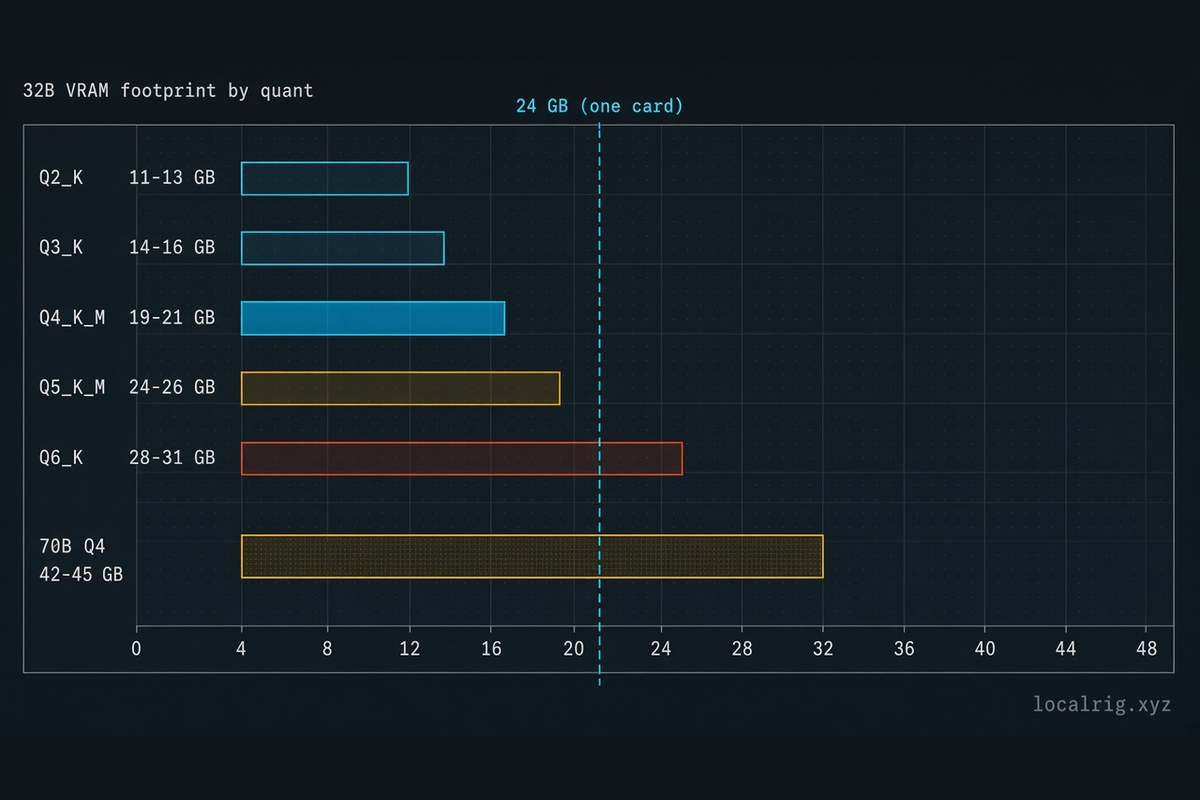
At Q4_K_M quantization (the community standard for quality-per-VRAM), a 32B model occupies roughly 19–21 GB. A 70B model in the same format needs 42–45 GB. That means a single 24GB card cannot hold a 70B model at usable quality; you need 48GB (two cards), or a single card with 40GB+, or a very high-end Mac. A 32B model, by contrast, fits in a single 24GB card with room for context and runtime overhead. That simple fact—fit versus no fit—cascades into the entire economics of running the model: fewer cards, simpler setup, less power draw, lower cost.
For Persona 2 (the local AI buyer who already owns or is comfortable acquiring a used 3090), this is the elimination of a problem. You can run a 32B model right now. You cannot run 70B on the same hardware, and the upgrade path to do so is expensive.
The quantization math: VRAM by format
A 32B model’s footprint in VRAM depends entirely on its quantization level. Unlike the 7B guide, which gives you a single-card floor, 32B forces a more deliberate choice because the difference between Q4 and Q5 is roughly 5–6 GB—often the difference between “fits comfortably on one card” and “you need to go dual-GPU or accept lower quality.”
| Quantization | ~VRAM needed | Use case | Trade-off |
|---|---|---|---|
| Q2_K (aggressive) | ~11–13 GB | Prototype / speed test | Quality loss is severe; not recommended for regular use |
| Q3_K (budget) | ~14–16 GB | Cost-sensitive work | Noticeable quality loss; fits on 12GB cards but leaves little overhead |
| Q4_K_M (standard) | ~19–21 GB | Most local work | Sweet spot—fits on 24GB with headroom; recommended default |
| Q5_K_M (high quality) | ~24–26 GB | Professional output / long contexts | Requires tight 24GB fit or 32GB+ card; noticeably better quality than Q4 |
| Q6_K (archive quality) | ~28–31 GB | Rarely needed locally | Requires 40GB+ card or dual-GPU setup |
| F16 (no quantization) | ~62–66 GB | Not practical for 32B locally | Needs datacenter-grade hardware |
The practical boundary for single-card 32B inference is Q4_K_M. It fits, it is fast enough, and the quality is excellent for chat, coding, and long-context work. Q5_K_M is possible on a very tight 24GB card with minimal headroom, or comfortably on a 32GB+ card (RTX 5090, A40, A100 datacenter-grade). Do not attempt Q6 on consumer single-card setups.
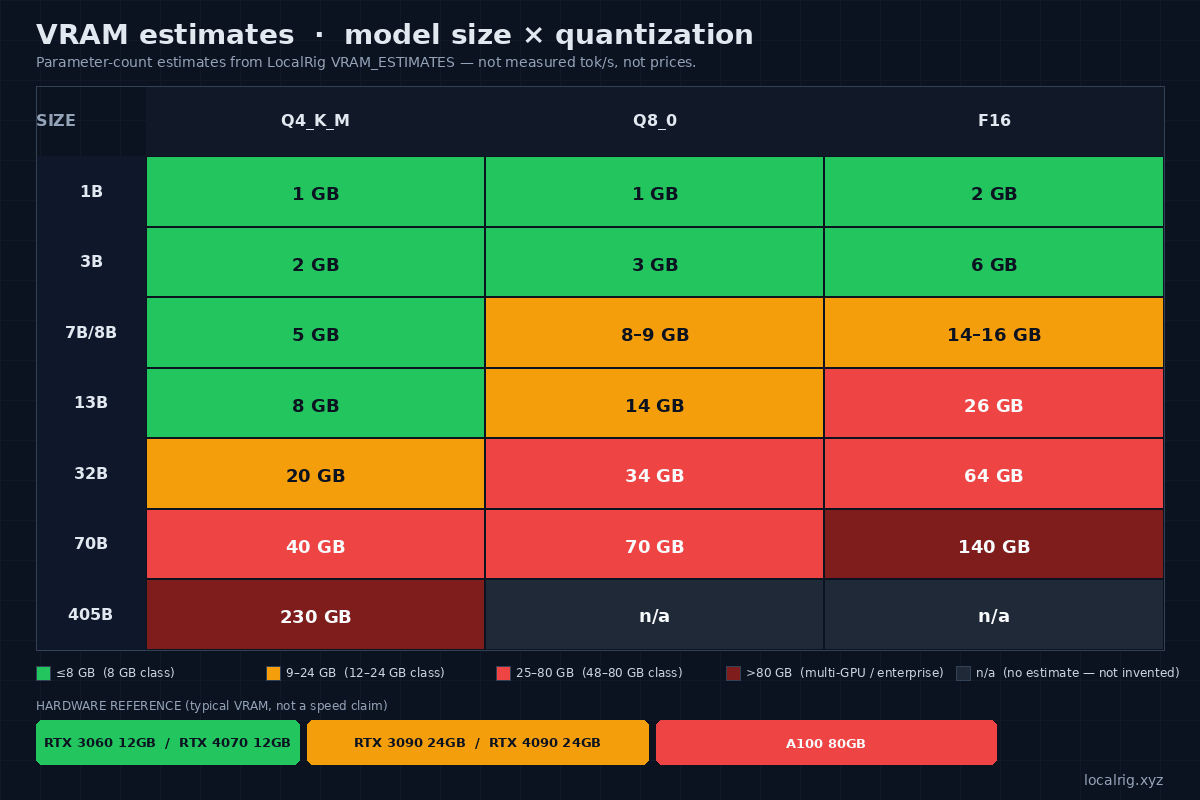
The matrix above is a parameter-count estimate map (LocalRig VRAM_ESTIMATES), not a tok/s chart and not a price list. 32B Q4 lands at 20 GB on that map — inside the 19–21 GB range in the table. 405B Q8/F16 cells are unknown and left n/a on purpose.
The cards that actually run 32B
Not all 24GB cards are created equal. Memory bandwidth—the speed at which weights are read—matters more as models grow larger. A 3090 and an RTX 4090 both have 24GB. The hardware catalog, verified 2026-06-27 and not re-read on 2026-10-06, lists 936 GB/s for the 3090 and 1,008 GB/s for the 4090. That is about 8%, not 50% faster. Community tok/s on this page were not re-run, so this page does not turn that spec gap into a new speed claim.
| GPU | VRAM | 32B Q4_K_M (est. tok/s) | 32B Q5_K_M (est. tok/s) | Power (TDP) | New / Used | Price range |
|---|---|---|---|---|---|---|
| RTX 3090 | 24 GB GDDR6X | ~40–50 | ~35–45 (tight) | ~300–350W | Used | $1,499 sold median (CompSniper, 2026-10-06) |
| RTX A6000 | 48 GB GDDR6 | ~30–40 | ~30–40 (comfortable) | ~250–300W | Used | ~$800–$1,400 (datacenter surplus) |
| RTX 4090 | 24 GB GDDR6X | ~50–65 | ~45–55 (tight) | ~450W | New | varies widely (retail) |
| RTX 5090 | 32 GB GDDR7 | ~90–120 | ~80–110 | ~575W | New | retail ($1,999+) |
| Apple M2 Max | up to 96 GB unified | ~25–35 | ~25–35 | ~40–50W | New | Mac tier |
| Apple M3 Max | up to 128 GB unified | ~30–40 | ~30–40 | ~40–50W | New | Mac tier |
Throughput estimates (“est. tok/s”) are extrapolated from community-cited 7B / 13B benchmarks (r/LocalLLaMA, modelfit.io 2025–2026) and not independently verified by LocalRig. Your actual speed depends on runtime version, CUDA build, thermal state, and context length. Use these as planning ranges, not gospel. The 3090 and 4090 figures assume llama.cpp via CUDA; Apple figures assume native Ollama or llama.cpp with Metal acceleration.
The picks, by constraint
Throughput-per-dollar for 32B Q4: used RTX 3090
At CompSniper’s $1,499 sold median (2026-10-06, typical $1,329–$1,599), the 3090 is still the 24GB card a 32B Q4 fits on. It is not a $500–$800 anchor, and a budget in that old band does not buy one. Expect 40–50 tok/s on a 32B Q4_K_M model—not fast, but faster than you can read, and enough for interactive chat with no perceptible waiting. Those tok/s were not re-run. If you already own a 3090, you do not need a second card for 32B Q4. If you are buying, the October median is the bill. The A6000 band on this page ($800–$1,400) was not re-fetched.
Browse used RTX 3090 24GB on eBay →
Best single-card speed and Q5 comfort: RTX 4090 or RTX 5090
The RTX 4090 (~$1,400–$2,000 new) runs 32B Q4 at ~50–65 tok/s and Q5 at ~45–55 tok/s. The RTX 5090 ($1,999+) does 32B Q4 at ~90–120 tok/s and Q5 at ~80–110 tok/s with 32GB of VRAM, so Q5_K_M is not a squeeze. If you want to run 32B at high quality without used-market risk or dual-GPU complexity, the 5090 is the modern pick—but it draws 575W and is substantially more expensive than the 3090. The 4090 is the pragmatic middle ground if the 3090 feels too slow and the 5090 feels too pricey.
Check RTX 4090 on Amazon → · Check RTX 5090 on Amazon →
32B Q5 without NVIDIA: used RTX A6000 or Apple Mac
The RTX A6000 (48 GB GDDR6, used datacenter surplus, ~$800–$1,400) is the surprise candidate. It has double the VRAM of a 3090, so 32B at Q5 fits comfortably with overhead. It draws less power than a 3090. Its memory bandwidth is lower (432 GB/s vs 936 GB/s on the 3090), so per-token speed is a bit slower (~30–40 tok/s on 32B Q4, instead of 40–50), but you are trading raw speed for headroom—the ability to run Q5 without stress and keep long contexts in memory. This is the pick if you need capacity and the 3090’s tight fit for Q5 bothers you.
Search for used RTX A6000 on eBay →
For Apple Silicon: an M2 Max, M3 Max, or M4 Max with 96GB+ unified memory will load and run a 32B model at ~25–40 tok/s. Unified memory removes the VRAM ceiling entirely—you do not have to choose between Q4 and Q5, you can use whichever quantization makes sense for your use case. The trade-off is lower bandwidth than NVIDIA’s GDDR6X, so decode is slower. If you already own a high-end Mac, or can afford one, 32B is very reasonable.
The quality story: 32B Q5 versus 70B Q2
This is the argument that justifies running 32B instead of “just buying hardware for 70B.” The quality per VRAM is not linear.
A 70B model at Q2_K quantization (the lowest acceptable quality tier for 70B, used to squeeze it into ~22 GB on two 12GB cards or a 24GB card in a pinch) trades away significant nuance in favor of fit. The model can answer your questions, but it drops detail, struggles with long chains of reasoning, and sometimes hallucinates context. A 32B model at Q5_K_M quantization, by contrast, preserves nearly full model fidelity while weighing half as much on the electrical bill.
The community consensus (r/LocalLLaMA, 2025–2026) is that a well-quantized 32B often outperforms a poorly quantized 70B in practice work, and that is not a bug—it is evidence that you should be choosing quantization based on the model and your workload, not defaulting to “bigger always fits in my hardware, so pick bigger.” A 32B model is not a compromise; it is a different constraint. If you own 24GB of VRAM and need to choose between a 70B model at Q2 (to fit) and a 32B model at Q5 (because it fits with comfort), the 32B will likely produce better output, run faster, and use less power. That is a clean win.
This is not “32B is always better than 70B.” It is “32B at high quantization often beats 70B at low quantization,” which is a specific, defensible claim grounded in the quantization math. For the full technical breakdown of what quantization does to model quality, see What Is Quantization.
Multi-GPU for 32B: when and why
If you own two 24GB cards (or a 24GB + 12GB pair), you can run 32B at Q5_K_M across both, or even touch 64B models at Q4. The catch is the same as it always is: two cards buy you capacity, not speed. Each token still requires reading all the model weights, and those weights are now split across two cards communicating over PCIe. You will not get 2× throughput. You will get the ability to fit a model that did not fit on one card. If that model is 32B Q5 (instead of Q4), or 64B instead of 32B, then the second card paid for itself. If you are buying a second card hoping to run 32B faster, you will be disappointed. Buy the second card for capacity, not for speed.
For the full multi-GPU story (and why NVLink matters), see the GPU buying guide.
Who this is NOT for
This guide assumes you are running 32B for single-stream inference—chat, coding, document work, local agents. It does not apply if:
- You are training or fine-tuning. Training has completely different requirements. A 32B model fine-tune needs gradient memory, optimizer state, and throughput-bound scheduling that this page does not address.
- You are serving many concurrent users. Multi-user production inference needs batching-aware runtimes (vLLM, SGLang) and fundamentally different hardware sizing. How to run LLMs locally covers that path.
- You have not sized your model yet. Before picking hardware, read the quantization guide and the buying framework to understand what size model actually solves your problem. A 32B model is not the answer to every question.
- You are counting on linear throughput from dual-GPU setups. It does not exist. Two 3090s do not produce 80–100 tok/s on 32B; they produce the capacity to fit the model.
Bottom line
32B is the 2026 local-LLM sweet spot because it fits in 24GB at Q4, it is fast enough to be useful, and it produces output quality competitive with much larger models at lower quantization. If you already have a used RTX 3090, or an Apple M3 Max with unified memory, 32B is the tier to run on that machine. A ~$500–$800 budget does not buy the October 3090. It closes the gap between “obviously I can run this 7B model” and “I need a whole new box for 70B”—and it often does so at better quality and lower cost than the 70B path when the card is already in the case.
The constraint logic is straightforward: pick the quantization your hardware comfortably holds (Q4 for 24GB cards, Q5 for 32GB+), size your model to that constraint, and do not chase the next size tier. 32B is not a consolation prize. It is the smart tier.
Frequently Asked Questions
Do I need 48GB VRAM to run a 32B model locally?
No. A 32B model at Q4_K_M quantization fits in 24GB with overhead. Q5_K_M requires 28–30GB, which means either two 24GB cards (48GB total), a single 40GB+ card (RTX 5090, or datacenter-grade A100/H100), or a high-end Mac. For most local work, 24GB with Q4 quantization is the practical tier.
Is 32B worth running instead of 70B?
For single-stream inference on a budget, yes. A 32B model is roughly 2× faster than a 70B on the same hardware, and a well-quantized 32B (Q5_K_M or better) often produces comparable or better output than a poorly quantized 70B (Q2_K or Q3). The quality tradeoff is model-specific and quantization-dependent, not size-dependent.
Can I run 32B on a Mac?
Yes, if it has enough unified memory. A 32B model at Q4_K_M needs roughly 20–22GB; M2 Max (up to 96GB unified), M3 Max (up to 128GB), and M4 Max (up to 128GB) all accommodate it. Speed will be lower than a comparable NVIDIA card because unified memory bandwidth is lower than GDDR6X, but it fits and works.